
Explore key tools, smart features, and expert insights...
A Routine Task Turns Risky
It is Monday morning and a substitute teacher is settling into a week-long assignment at a primary school. They have been given temporary access to the school's student information system enough to view attendance records, grade sheets, and parent contact details for the classes they are covering. Wanting to be well-prepared, they export a spreadsheet of student information and attempt to upload it to their personal Google Drive so they can review it from home that evening.
The action is blocked. But it nearly was not.
Why Temporary Staff Are a Persistent Challenge
This scenario plays out more often than school IT administrators realize. Substitute and temporary teaching staff represent a persistent access management challenge. They need enough system access to do their jobs, but they operate outside the normal channels of device management, security training, and offboarding. They use their own devices, apply their own judgment about what is reasonable to do with school data, and often have no awareness of the legal frameworks that govern how that data can be handled.
The Compliance Risk of Personal Devices
A spreadsheet containing student names, grades, home addresses, and parent contact numbers is not a trivial document. On an unmanaged personal device, it represents a serious compliance exposure. The school does not control the substitute's home laptop. It does not know whether that device is shared with family members or whether it will be properly secured after the week is over. The scale of the problem compounds quickly in a district with dozens of schools and hundreds of substitute placements per term. The only realistic solution is a technical control that operates automatically, at the browser level, regardless of who is sitting at the keyboard.
How Chrome Enterprise Premium Protects Student Data
Chrome Enterprise Premium addresses this with two controls that work together. The first is Data Loss Prevention, which detects sensitive content in outgoing files, student names, contact information, identification numbers and blocks uploads to non-approved destinations before they complete. The second is URL Filtering, which restricts browser access to personal cloud storage domains entirely, so the upload cannot even be initiated from a school-managed device or Chrome profile.
Together, these features close the gap that temporary staff represent. A substitute teacher attempting to upload a student data export to personal Google Drive or Dropbox will find that the action is blocked at the browser level not because they are suspected of wrongdoing, but because the school's policy does not permit that category of data to travel to that category of destination.
The controls are applied through the Chrome profile or the managed device, meaning they follow the user's school-issued session rather than the device itself. This is particularly important in environments where staff bring their own hardware. Even on a personal laptop, if the teacher is signed into a managed Chrome profile, the policy applies. URL Filtering adds a second layer by blocking access to personal cloud storage domains for the organizational unit covering temporary and substitute staff. The school's own Google Workspace remains fully accessible; only the destinations that fall outside the approved data boundary are restricted.
The result is a security model that does not require substitute teachers to understand data protection law. The right behavior is the only available behavior. Student records stay within the school's approved environment not because every temporary employee made the right call, but because the system did not give them a choice.
Gain Visibility Before You Enforce Controls
Schools often have little visibility into what is happening inside the browser across their fleet, especially with temporary staff who come and go throughout the year. The Chrome Readiness Tool's CEP Accelerator, coming soon to Browser Insights, is built for exactly this kind of environment.
CEP Accelerator evaluates three key signals: browser extensions, accessed domains, and device security status. For extensions, admins can override default classifications via the Report Generator, marking internally trusted tools as verified or flagging others based on organizational policy. For domains, the tool automatically flags sites using HTTP instead of HTTPS, as well as domains associated with phishing risk. Administrators can then use the Custom Domain Readiness feature to mark additional domains as restricted based on internal policies, or reclassify flagged ones as allowed if verified as safe.
Beyond protocol-level risks, CEP Accelerator also surfaces domains by risk category to help schools understand the broader context of where their staff are browsing. AI platforms where users may input sensitive data, content sharing sites where school records could be distributed externally, and social media platforms where staff may inadvertently share organizational information are each flagged with advisory guidance to help IT teams take appropriate action.
Use the Chrome Readiness Tool to understand what temporary staff are running in the browser before enforcing DLP and URL filtering policies. The visibility comes first. The enforcement follows.
A Simple Mistake with Serious Consequences
A bank teller is wrapping up a loan application for a customer. The process is familiar; they have done it hundreds of times. They open the file attachment browser, quickly select what they believe is the right PDF, and attach it to the outbound email. The email goes out. A few minutes later, the phone rings. It is a different customer, confused and alarmed, asking why they just received someone else's financial documents.
What the teller attached was not the right file. It was a scanned loan document belonging to another customer, entirely containing that person's full name, national ID number, income details, credit history, and account information. It took three seconds to make the mistake. It will take considerably longer to manage the consequences.
Why Everyday Workflows Lead to Data Exposure
This is not a story about a reckless employee or a sophisticated cyberattack. It is a story about how easily a completely ordinary workflow produces a data breach. In financial services, misfiled attachments, accidental forwards, and wrong-recipient emails are among the most common sources of regulatory incidents. They are also among the hardest to prevent with traditional tools, because the file itself is not dangerous; it is just a legitimate document going to the wrong place.
Traditional email filters are designed to catch threats: malware, phishing links, and known bad domains. They are not designed to understand the content of an outgoing PDF and evaluate whether it should be going to the recipient it is addressed to. The problem is even more acute in environments where staff are handling dozens of customer files simultaneously under time pressure. Security controls that require staff to slow down and double-check every attachment are not realistic at scale. What is realistic is a control that catches the mistake automatically, at the moment it happens.
How Chrome Enterprise Premium Prevents Costly Mistakes
Chrome Enterprise Premium's Data Loss Prevention feature monitors browser-level actions, including file uploads and email attachments through web clients in real time. When the teller selects and attaches the document, Chrome scans its content before it is sent. If the file contains financial PII account numbers, national IDs, or income figures, the system evaluates whether that content is being sent through an approved channel to an appropriate destination. If it does not pass that check, the action is blocked, or the user is prompted with a warning that requires them to review before proceeding.
This is not a blanket restriction on sending attachments. Tellers can still do their jobs normally. The DLP policy is precise: it looks at content, not file type or file name. A blank template goes through without issue. A document containing another customer's financial identifiers triggers the control. The power of browser-level DLP is that it operates at the exact moment the risk occurs, not after the fact, not at the network perimeter, but right at the point where the teller is about to send the wrong file.
Chrome Enterprise Premium also logs every DLP event blocked warned, and allows compliance teams a complete audit trail of sensitive file movements across the organization. In a regulatory environment where financial institutions are required to demonstrate controls over customer data, the log is essential. The policy can also be tuned over time, starting in warn mode where users are alerted but not blocked, then escalating to full enforcement once the volume and nature of at-risk actions are well understood. This makes rollout practical rather than disruptive, and gives IT teams the data they need to refine the policy before it affects daily operations.
Identify Risk Before It Becomes an Incident
Accidental data exposure often begins with browser activity that IT teams have no visibility into. The Chrome Readiness Tool's upcoming CEP Accelerator gives you the context to understand where your risks are concentrated, including visibility into browser extensions that may be interacting with sensitive document workflows without your knowledge.
CEP Accelerator also helps administrators understand the risk profile of websites their workforce is accessing. Domain categories provide contextual guidance on potential risks, with advisory messages to help organizations take appropriate action based on internal policies.
AI Websites -- Platforms where users can input or process data, which may include sensitive or confidential organizational information.
Content Sharing Platforms -- Sites that allow users to upload or distribute files, which may be used to share internal data externally, intentionally or not.
Social Media Platforms -- Sites where employees may share sensitive or company-related information through posts, messages, or interactions.
Deploy the Chrome Readiness Tool to understand your browser-level exposure before your next compliance audit, then use Chrome Enterprise Premium's DLP controls to make sure the right documents only ever reach the right people.
Many IT teams already track browser versions, extension usage, and overall readiness across their environment. That kind of visibility is useful, but it does not always tell the full story. Security-related issues can still sit beneath the surface, making it difficult for teams to spot them early, understand their impact, and respond with confidence.
That gap matters more than ever. Risk can build quietly through browsing behavior that does not look alarming at first. An unverified extension may be installed and go unnoticed. A user may visit a site that lacks HTTPS protection. A device may be exposed to a session theft vulnerability without that risk being clearly surfaced in the dashboard. These are not just isolated signals. Together, they can point to larger security concerns across the organization.
The challenge is not simply collecting more data. It is turning browser activity into security context. IT teams need a way to identify meaningful risk, understand what deserves attention, and apply their own standards to what should be flagged. Without that, even strong browser visibility can leave security blind spots behind.
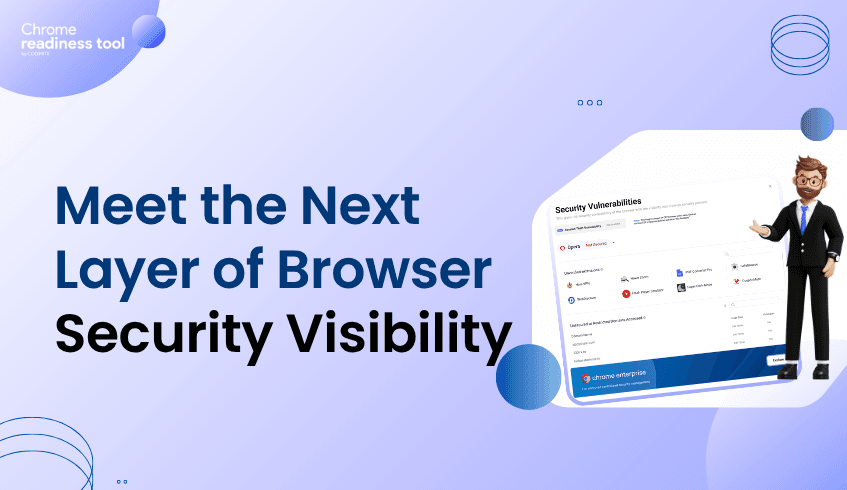
That is why we are introducing CEP Accelerator, a new enhancement for Chrome Readiness Tool that brings deeper security visibility into Browser Insights through an upcoming Security Vulnerabilities experience.
This new capability is designed to help administrators move beyond operational browser data and into a clearer understanding of browser-related security exposure. Instead of relying on scattered signals or manual interpretation, teams will be able to view key vulnerability indicators directly in the dashboard and investigate them in a more focused way.
CEP Accelerator makes it easier to identify affected devices and understand where higher-risk conditions exist. By bringing this into Browser Insights, teams can detect exposure earlier and make it part of everyday security monitoring.
CEP Accelerator introduces visibility into unverified extensions and unsecured domains and session theft vulnerabilities, by custom readiness for unverified extensions and domains.
For extensions, IT admins can use the report generator to configure whether a specific extension should be treated as unverified. This creates a more flexible model for extension oversight, allowing teams to classify risk based on their own policies rather than relying only on fixed definitions.
For domains, when a user visits a site that does not use HTTPS, Browser Insights can display an indicator showing that the site may be unsafe. From there, the IT admin can decide whether that domain should be classified as an unsecured or unsafe domain within their readiness setup. This helps teams move beyond passive reporting and into a more tailored way of managing domain-related risk.
Session theft visibility in the Chrome Readiness Tool is designed to provide a high-level view of potential exposure across devices. Rather than performing deep attack-level detection, this insight is derived from the presence or absence of Chrome Enterprise Premium (CEP) security policies that are intended to mitigate session hijacking risks. By surfacing this information directly within Browser Insights, administrators can quickly understand where session protection measures are in place and where potential gaps may exist.
What makes this launch powerful is not just the added visibility but the control that comes with it.
Every organization defines risk a little differently. A browser extension that is acceptable in one environment may raise concerns in another. A domain that appears harmless in one case may need to be monitored more closely in another. CEP Accelerator supports that reality by giving administrators both the signals and the flexibility to decide how those signals should be interpreted.
The result is a more practical security experience inside Browser Insights. One that helps teams reduce blind spots, surface meaningful issues faster, and make better decisions with the right context in front of them.
With CEP Accelerator, Browser Insights is becoming more than a view into browser activity. It is becoming a stronger tool for understanding browser security posture across the organization.
From session theft vulnerability to unverified extensions and unsecured domains, this upcoming release is designed to help IT teams see more, understand more, and act sooner.
Imagine a valid username and password for your company’s financial controller are entered into your Salesforce login page. On paper, the "identity" is verified. However, the login isn't coming from the controller’s managed corporate laptop in London; it is coming from an unmanaged, personal device in a different country, a device that happens to be infected with a silent credential-stealer.
In a traditional security model, that password is a golden ticket. But in a modern, identity-aware environment, the password is only one piece of a much larger puzzle. This is the core of Context-Aware Access, a strategy designed to stop the "BYOD breach" before it even begins.
Many organizations have moved to the cloud, but their security logic remains tethered to the past. They rely on "Identity and Access Management" (IAM) to prove who a person is, but they neglect the "Context" , the "how," "where," and "what" of the connection.
The Managed vs. Unmanaged Gap: When employees or contractors use personal devices (Bring Your Own Device), they often bypass the security controls of the corporate network.
The MFA Bypass: Modern attackers don't just steal passwords; they steal session cookies. If an attacker clones a session from a personal laptop, they can often bypass Multi-Factor Authentication entirely.
The Shadow Device Risk: An unmanaged device may have outdated security patches or active malware, turning a legitimate login into a backdoor for ransomware.
Chrome Enterprise Premium solves this by transforming the browser into a dynamic security gatekeeper. Instead of a binary "Yes" or "No" based on a password, the system evaluates the context of the request in real-time.
IT leaders can implement a solution-focused defense that adapts to the risk level of each session:
Continuous Security Posture Checks: Before granting access to sensitive apps like Jira or Workday, the browser checks the device's health. Is the OS updated? Is the screen lock enabled? Is it a managed corporate device?
Adaptive Access Levels: If a user logs in from a personal laptop, you don't have to block them entirely. You can grant "Restricted Access" allowing them to view data in the browser while blocking the ability to download, print, or copy-paste sensitive information.
Geographic and Network Fencing: Access can be gated based on the user's location or IP reputation, ensuring that high-value resources are never exposed to high-risk regions or suspicious networks.
To build an effective context-aware policy, you first need to see who is knocking at your door. The Chrome Readiness Tool provides the diagnostic visibility required to identify your organization's highest-risk access points.
The Chrome Readiness Tool highlights the vulnerabilities that lead to credential abuse:
Session Theft Vulnerability: The tool shows session hijacking risks. It identifies instances where active login cookies may have been compromised, a critical signal that a "verified" identity may actually be an attacker.
Unverified Domain and Extension Tagging: To prevent "Shadow IT" from becoming a bridge for attackers, the tool displays a tag for domains or extensions that might be unsafe. Administrators can mark these as unsafe directly from the report generator, preventing unvetted tools from interacting with corporate credentials.
Device Integrity Mapping: See a breakdown of browsers that are running on outdated versions, allowing you to prioritize which teams need the strictest context-aware policies.
The story of the 2:00 AM login doesn't have to end in a breach. With Chrome Enterprise Premium, that login attempt is flagged because the context doesn't match the identity. The browser sees the unmanaged device and the suspicious location, and it automatically denies access long before the attacker can move laterally through your network.
By using the Chrome Readiness Tool to audit your environment and Chrome Enterprise Premium to enforce context-aware controls, you ensure that your data is protected by more than just a password. You are protecting it with the full power of real-time intelligence.
In today’s landscape, a single browser tab can be the difference between a productive afternoon and a multi-million dollar data breach. For most employees, the browser is where they live, accessing everything from Salesforce and Jira to sensitive internal financial dashboards.
Traditional security stacks often struggle to see what happens inside that tab. To help bridge the gap between abstract features and concrete security, we’ve mapped Chrome Enterprise Premium to four common, real-world attack scenarios that keep IT leaders up at night.
The Scenario: An employee receives a highly convincing "urgent" email about a payroll update. They click the link, which leads to a pixel-perfect replica of the company’s login page. Thinking they are authenticating, they hand over their credentials to a malicious actor.
The Solution with Chrome Enterprise Premium:
Real-time URL Scanning: While standard browsers rely on static lists, Chrome Enterprise Premium uses AI-powered, real-time scanning to identify zero-day phishing sites the moment they are visited.
Password Reuse Detection: If an employee inadvertently enters their corporate password on an unvetted site, the browser triggers an immediate warning and can block the submission, stopping the credential theft in its tracks.
The Scenario: A contractor uses their personal, unmanaged laptop to access the company’s Confluence and Bitbucket instances. Unknown to them, their personal machine is infected with infostealer malware that captures their session cookies, allowing an attacker to bypass Multi-Factor Authentication (MFA) and gain full access to the source code.
The Solution with Chrome Enterprise Premium:
Context-Aware Access: Using Zero Trust principles, the system evaluates the device's security posture. If a login attempt originates from an unmanaged or "low-trust" device, access to sensitive apps can be restricted or denied entirely.
Agentless Control: You can enforce security policies, like blocking downloads or disabling copy-paste, directly through a managed Chrome Profile, protecting data even on hardware you don't own.
The Scenario: A departing salesperson attempts to download a massive client list from Salesforce or copy-paste confidential pricing strategies into a personal Gmail draft before their final day.
The Solution with Chrome Enterprise Premium:
Advanced Data Loss Prevention (DLP): IT can set granular rules that recognize sensitive data types (like PII or financial patterns). The browser can then block the upload, download, or printing of that content in real-time.
Deep Content Inspection: Unlike legacy tools that only look at file names, Chrome Enterprise Premium scans the actual content of files and clipboard actions to ensure hidden sensitive data doesn't leave the perimeter.
The Scenario: An employee installs a "productivity" extension found in a third-party store to help manage their Jira tickets. The extension works as advertised but secretly records every keystroke and exfiltrates session tokens for HR and ERP platforms.
The Solution with Chrome Enterprise Premium:
Extension Telemetry & Management: IT gains total visibility into every extension across the fleet. High-risk permissions are flagged, and unverified add-ons can be blocked centrally.
Malicious Behavior Detection: The browser monitors for anomalous extension activity, such as an add-on attempting to scrape authentication tokens, and provides the SOC team with the telemetry needed to remediate the threat instantly.
Before you can defend against these attacks, you need to know where your "blind spots" are. The Chrome Readiness Tool acts as your diagnostic command center, providing the data needed to justify a move to Chrome Enterprise Premium.
Custom Readiness for Unverified Domains: The tool automatically identifies and displays a tag for domains or extensions that might be unsafe. It empowers administrators to mark these as unsafe directly from the report generator, creating a custom readiness baseline for the organization.
Session Theft Vulnerability: The tool specifically flags vulnerabilities with session hijacking, identifying situations where sessions may have already been compromised.
Extension Inventory: See the Extension name, version, ID and installed browser across your fleet and identify "Shadow IT" before it becomes an entry point for an attacker.
By combining the diagnostic insights of the Chrome Readiness Tool with the enforcement power of Chrome Enterprise Premium, organizations stop speaking in abstracts and start building a concrete, resilient defense where work actually happens.
Imagine a Security Operations Center (SOC) on a Friday afternoon. An alert triggers: sensitive data has left the network. The team springs into action, pulling logs from the Endpoint Detection and Response tool, checking the firewall, and reviewing the Cloud Access Security Broker reports.
They can see the what and the where; a 50MB PDF was uploaded to an external site. But they hit a wall when it comes to the how. Was that file a legitimate download from the company's Jira board? Was it sensitive intellectual property copied directly from a SharePoint folder? Or was it moved during an unauthorized browser session that traditional tools simply could not see?
This is the browser blind spot. Even with a robust security stack, most SOC teams remain blind to the granular actions occurring inside the browser, where modern work happens.
For years, security has been built around the perimeter and the endpoint. However, as applications move to the cloud, the perimeter has shifted to the browser tab. Traditional tools often see the browser as a single process, failing to distinguish between a user checking the news and a user extracting core business data.
The EDR Gap: While Endpoint Detection and Response is excellent at catching malware executing on a hard drive, it often struggles to provide telemetry on in-browser events like a user copying text from a secure SaaS app into a personal webmail draft.
The Network Limit: Firewalls and encrypted traffic inspectors can see that data is moving, but they lack the context of the user’s intent or the specific web-based workflow they were following.
To eliminate this blind spot, security must move directly into the browser. Chrome Enterprise Premium acts as a high-fidelity telemetry layer, providing the SOC team with the missing context needed to reconstruct the full chain of an incident.
By integrating security at the browser level, organizations gain a solution-focused approach to incident response:
Granular Event Telemetry: Instead of seeing generic web traffic, security teams get detailed logs on specific browser actions such as file uploads, downloads, and even copy-paste events across all web applications.
Direct Data Visibility: IT can identify exactly which document was moved and which platform it originated from, whether it was Salesforce, Slack, or an internal reporting tool.
Context-Aware Enforcement: Beyond just seeing the problem, Chrome Enterprise Premium allows teams to set proactive policies. If a file is deemed sensitive, the browser can block the upload in real-time based on the user identity and the security posture of the device.
Before a breach occurs, IT leaders must understand where their visibility gaps are widest. The Chrome Readiness Tool serves as the diagnostic gateway, allowing organizations to audit their fleet and identify the technical risks that contribute to the browser blind spot.
The Chrome Readiness Tool highlights key areas where security posture may be lacking through specialized features:
Unverified Domain and Extension Tagging: The tool automatically displays a tag for domains or extensions that might be unsafe. This empowers administrators to review and mark these entities as unsafe directly from their end, creating a customized blocklist based on real-time organizational data.
Session Theft Identification: The tool flags session theft vulnerabilities where attackers steal active login cookies to bypass Multi-Factor Authentication, a common vulnerability that often goes undetected by traditional network security.
Version Integrity: It maps out which browser versions are being used across the fleet, ensuring the entire organization is patched against known threats.
In the modern enterprise, a security strategy that ignores the browser is incomplete. By utilizing the Chrome Readiness Tool to map out risks and identify unverified domains, and using Chrome Enterprise Premium to enforce deep telemetry and control, SOC teams can finally close the browser blind spot.
When you can see exactly what happens inside the tab, you do not just respond to breaches faster,you stop them from happening in the first place.
Imagine a typical Tuesday morning at a fast-growing mid-sized firm. Sarah, a senior project manager, starts her day. She doesn't open a complex suite of local software; she opens a browser. Within minutes, she is toggling between Google Workspace to draft a proposal, Salesforce to update lead status, and Jira to check on the latest sprint. Later, she’ll jump into Slack to coordinate with her team and download a sensitive financial report from an internal web app to upload it into a shared Confluence page.
In this story, Sarah never left her browser. For her, and for millions of employees globally, the browser is no longer just a tool for "surfing the web" it is the office itself. It is the primary gateway where employees log in, move files, copy data, and approve critical workflows.
However, many organizations are still trying to protect this modern workflow using a decades-old playbook. They rely heavily on traditional endpoint antivirus or rigid network firewalls, often missing the very place where the work and the risk is actually happening.
When your "office" is a collection of SaaS platforms like Microsoft 365, Salesforce, and Slack, your security needs to live where your data lives. This is where Chrome Enterprise Premium becomes the essential control layer for the modern enterprise.
By integrating security directly into the browser, organizations can move from a reactive posture to a proactive, solution-focused model. Chrome Enterprise Premium provides the visibility and control required to manage today's fluid work environment without the friction of legacy tools.
Granular Data Control: In Sarah’s workflow, she is constantly moving data. Chrome Enterprise Premium allows IT to set policies that prevent sensitive information from being copied, pasted, or downloaded from high-risk web applications, ensuring corporate IP stays within approved environments.
Context-Aware Access: Instead of a "one-size-fits-all" login, access to systems like Jira or internal HR portals is gated by the health of the device and the identity of the user. If Sarah tries to access a report from an unmanaged device at a coffee shop, the browser can automatically step up authentication or restrict the download.
Real-time Threat Prevention: As employees navigate between various internal and external web apps, Chrome Enterprise Premium acts as a silent guardian, scanning for phishing sites and malware in real-time, blocking threats before they can hit the endpoint.
To implement this level of control effectively, IT leaders first need to understand their current landscape. The Chrome Readiness Tool acts as the diagnostic engine for this transition. It provides the data-driven "proof" needed to see exactly how browsers are being used and where the gaps exist.
The Chrome Readiness Tool highlights the invisible risks in the daily grind:
Visibility into Extension Sprawl: It identifies the dozens of add-ons employees might have installed to "help" with their SaaS workflows, which could actually be leaking data.
Version Integrity: It maps out browsers along with their browser versions.
Domain Security Audit: It monitors when users interact with unencrypted or untrusted domains, providing a clear map of where sensitive data might be at risk during a normal workday.
By combining the diagnostic power of the Chrome Readiness Tool with the enforcement capabilities of Chrome Enterprise Premium, organizations stop chasing threats and start managing them.
The goal isn't to restrict employees like Sarah; it is to empower them. When the browser becomes a secure, managed workspace, IT can reduce operational overhead, eliminate the need for cumbersome VPNs for web apps, and provide a seamless experience that protects the company’s most valuable assets.
The shift has already happened: the browser is the new perimeter. It’s time your security strategy lived there, too.
The Proxy Bypass Attempt
Imagine a worker who wants to access a streaming video site that the company firewall currently blocks to preserve bandwidth. To get around this restriction, the employee searches for a free web proxy or anonymizer site, hoping to route their traffic invisibly. They intend to bypass productivity controls and stream their content undetected.
The Risk of Anonymizer Sites
While the employee's goal might just be entertainment, the method they use introduces a severe security vulnerability. Proxy sites and anonymizers purposefully route traffic outside of corporate visibility, bypassing established firewall rules and security filters. This creates a dangerous backdoor into the network. Many free proxy services are heavily monetized through malicious advertisements or are actively monitored by bad actors seeking to intercept sensitive data traversing their servers. Data sent to unsecured domains can be intercepted by Man-in-the-Middle attacks.
Enforcing Compliance with Chrome Enterprise Premium
To maintain a secure and compliant environment, IT administrators need tools that cannot be easily bypassed by savvy users. Chrome Enterprise Premium empowers organizations to enforce web policies directly at the endpoint. The platform allows administrators to restrict access to URLs based on category natively within the browser. When the user attempts to load the proxy or anonymizer site, the URL filtering engine recognizes the restricted category and stops the connection immediately, maintaining corporate compliance and preventing the establishment of an unsecured backdoor.
Upgrading to Chrome Enterprise Premium gives IT teams the comprehensive control they need to secure the browsing environment. Benefits of this targeted approach include:
Restricting access to URLs based on category to enforce acceptable use policies.
Strengthening the security posture to account for dynamic changes in a user's context.
Keeping users away from visiting harmful sites through real time protections.
Protecting applications in hybrid deployments from unauthorized external routing.
Exposing Shadow IT with the Chrome Readiness Tool
Users frequently attempt to bypass security rules using browser add-ons rather than just visiting proxy websites. The Chrome Readiness Tool is vital for uncovering these hidden evasion tactics. The tool counts all unique browser add-ons installed across the fleet.
Crucially, it flags Unverified extensions that have not been vetted for enterprise security standards. These tools could act as Trojan horses to inject ads or steal data. By running the Chrome Readiness Tool, administrators can identify exactly where users are attempting to bypass security controls, allowing IT to tighten their filtering categories effectively using Chrome Enterprise Premium.
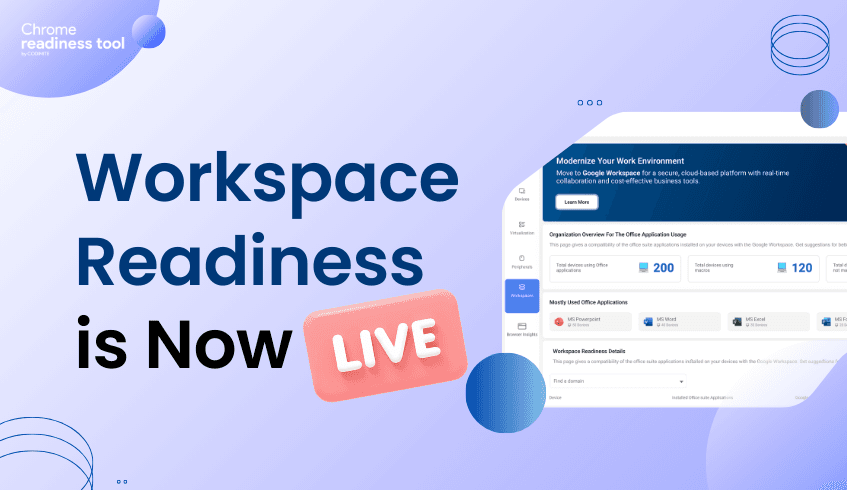
We are excited to announce that Workspace Readiness – Desktop version is now live in the Chrome Readiness Tool. This feature provides IT administrators with clear, data-driven visibility into how desktop installed office productivity applications are used across their organization.(Currently supported for Microsoft Office 365 and WPS only) Instead of relying on assumptions when planning cloud transitions, teams can now evaluate real usage data to determine readiness for Google Workspace.
As organizations continue adopting cloud-first strategies, reducing reliance on legacy desktop productivity software becomes an important step. However, moving away from established tools such as Microsoft Office requires careful planning. IT teams must understand application usage, technical dependencies, and potential compatibility issues before making the transition. Workspace Readiness – Desktop addresses this challenge by analyzing real-world application usage and highlighting where migration can proceed smoothly and where additional preparation may be required.
The feature begins with a high-level overview of desktop office suite applications usage across the organization. This allows administrators to understand the overall scale of dependency on legacy tools before initiating migration planning.
Key insights available at the organizational level include:
Office application usage overview Displays the total number of devices currently running office applications across the organization.
Macro dependency tracking Shows how many devices use macros and how many do not, helping teams quickly identify potential technical complexity.
Top application identification Highlights the five most widely used office applications, allowing compatibility planning to focus on the most important tools.
Beyond high-level metrics, Workspace Readiness – Desktop provides deeper device-level insights. These details help IT teams identify specific risks, understand application behavior, and uncover opportunities to optimize software usage.
The device-level view includes:
Installed versus used application analysis A visual comparison shows how many applications are installed versus how many are actively used, helping teams understand actual software requirements.
Unused application detection Applications that are not used at all by the user are automatically listed, allowing administrators to identify redundant software that may be removed.
Active usage metrics For applications that are actively used, the system shows total usage time in hours to help prioritize tools that employees rely on most.
Cloud transitions can sometimes stall due to technical limitations. Workspace Readiness – Desktop helps prevent this by identifying potential blockers early in the planning process.
The platform highlights several technical factors that may affect migration:
Macro usage detection Flags applications that use on macros, helping IT teams identify workflows that may require remediation.
Limitation indicators Displays potential compatibility file issues that could impact a migration to Google Workspace.
To simplify migration planning, the feature also maps legacy desktop applications to their Google Workspace equivalents.
Google Workspace suggestions Detected desktop applications are mapped directly to their corresponding Workspace tools, such as Microsoft Word, mapped to Google Docs.
Migration decision support These mappings help administrators quickly determine which users and applications are ready for transition.
With Workspace Readiness – Desktop version now available in the Chrome Readiness Tool, organizations can replace assumptions with real usage insights. By combining organizational visibility, device-level analysis, and clear technical indicators, IT teams can reduce migration risks, optimize software environments, and move toward Google Workspace with greater confidence.